Windows 7 has a fairly decent built-in data backup program, but it's not as full-featured as most of the commercial application that are available on the market.
If you're looking for a Windows based backup application that is more robust then what comes with the OS, check out GFI Backup Home Edition.
Currently its available for free. See the following site for more product information and links to download the software.
Monday, August 30, 2010

Monday, August 09, 2010
Windows 7: Windows Recovery Environment
Windows Recovery Environment (Windows RE) provides you with tools for fixing a non-booting computer. In Windows 7, Windows RE is installed on your PC's system disk, so if there's a problem you can boot into this environment and attempt to fix it.
To access the Windows 7 Recovery Environment, reboot your PC and after the BIOS screen has completed, press and hold the F8 key (you must do this before the "Starting Windows" animation begins). From the system troubleshooting options screen, select the "Repair Your Computer" option.
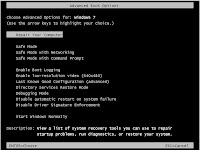
After a few loading screens you will be asked to log on with an administrator-class account. Finally you will be presented with the System Recovery Options screen.
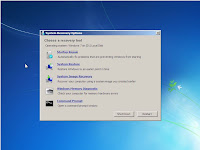
The System Recovery Options window provides you access to the following repair/recovery tools.
To access the Windows 7 Recovery Environment, reboot your PC and after the BIOS screen has completed, press and hold the F8 key (you must do this before the "Starting Windows" animation begins). From the system troubleshooting options screen, select the "Repair Your Computer" option.

After a few loading screens you will be asked to log on with an administrator-class account. Finally you will be presented with the System Recovery Options screen.

The System Recovery Options window provides you access to the following repair/recovery tools.
- Startup Repair: Automatically repairs common boot problems that can prevent Windows from starting correctly.
- System Restore: Provides access to the System Restore feature from outside of Windows. Allows you to restores your Windows system files to a previous state.
- System Image Recovery: Restores a previously system image backup.
- Windows Memory Diagnostic: Reboots your computer and loads memory diagnostic utility that scans your computer's RAM for problems.
- Command Prompt: This is an advanced feature that allows system administrators access to a standard Windows command prompt.
Saturday, August 07, 2010
Article: Firefox could leapfrog Chrome with new OS-like interface
TechRepublic reports: "During 2010, Firefox has had much of its momentum as an alternative Web browser stolen by Google Chrome. However, a new Firefox innovation called Tab Candy will make Firefox act more like a operating system, with much-improved multitasking and sharing capabilities. In fact, if the Firefox team can pull off all of the features of Tab Candy that it recently demonstrated, it would leapfrog Chrome in functionality." (read the rest of the article)
Monday, July 12, 2010
Article: Mozilla's Firefox 4 Web Browser Gets an Overhaul, Inside and Out
eWEEK Labs reports: "The first beta release of Firefox 4 offers individuals and organizations a first look at the upcoming version of the popular open-source Web browser. The browser's new features include a UI facelift, a new Add-Ons manager, support for the HD HTML5 WebM video format, and process isolation for browser plug-ins. Check out the slide gallery below for a look at the new browser in action."
See the slide show for more information.
See the slide show for more information.
Tuesday, June 29, 2010
Windows 7: Securely Erasing Data Using the Cipher Tool
When you delete files from the hard drive, that doesn't mean the data has been destroyed. There are several programs out there that can recover deleted files. There are also a great of programs that can securely erase files, and even whole hard drives.
What happens if you delete sensitive files, and want to make sure they are not recoverable. There is a command line tool that will allow you do it this, it's called the Cipher command.
What happens if you delete sensitive files, and want to make sure they are not recoverable. There is a command line tool that will allow you do it this, it's called the Cipher command.
Warning: This operation overwrites the selected files with
random characters, so they will not be recoverable after the operation is performed.
- Open a command prompt with elevated privileges (in the Start menu search field type CMD.EXE and press Ctrl+Shift+Enter)
- In the command prompt, type cipher /w [drive]:\[folder], substituting the drive letter and folder path for [drive] and [folder].
For example, to erase the contents of a folder named "Classified" in the Documents folder of a user named Ted on the C: drive, you would type "cipher /w C:\Users\Ted\Documents\Classified"
Monday, June 28, 2010
Toshiba libretto W100
Features of the Toshiba libretto W100:
- Run Windows 7 Home Premium
- Dual 7” diagonal multi-touch screens
- Weighs under two pounds
- Wireless-N and Bluetooth® v2.1
- Webcam
Wednesday, June 16, 2010
Windows 7: Pin a File to the Taskbar
One of Windows 7's new features is the ability to pin applications to the taskbar. What happens if you want to pin a document to an application in the taskbar.
To do this, from the desktop or the Windows Explorer, drag a file to a application in the Windows 7 taskbar (for example, drag a .DOC file to the Word icon). Then to access that document, all you have to do is right-click the program's icon and select the file.
To do this, from the desktop or the Windows Explorer, drag a file to a application in the Windows 7 taskbar (for example, drag a .DOC file to the Word icon). Then to access that document, all you have to do is right-click the program's icon and select the file.
Saturday, June 05, 2010
Firefox: Enabling Taskbar Preview (Windows 7 Only)
Do you want to try a cool hidden feature of Firefox. Personally I am not sure why this feature is not turned on by default. Maybe some my find it annoying, but I like it. Its gives Firefox a tab preview feature that use to only be in Internet Explorer for Windows 7.
- Launch Firefox
- In the URL field type: ABOUT:CONFIG
- In the Filter field type: browser.taskbar.previews.enable
- Change the value of the preference name to: True
Note: This feature is only available in Windows 7

Monday, May 31, 2010
Article: The very best Sysinternals tools for Windows server security
TechTarget reports: "I'm often surprised by the lack of Windows server administration tools that are used in some enterprises. Many administrators I work with just use the built-in tools that ship with Windows Server -- something I liken to going through life without experiencing the exhilaration of a powerful and great-handling sports car."
Sysinternals has some great general purpose diagnostic tools that any Windows power user should have in their digital toolchest, this article points a few of them out.
Sysinternals has some great general purpose diagnostic tools that any Windows power user should have in their digital toolchest, this article points a few of them out.
Saturday, May 22, 2010
Windows 7: Run A Program With Administrative Privileges
Older programs sometimes require administrative privileges in order to run properly. To enable this feature follow the instructions below:
- Right-click the program's shortcut, select Properties.
- Press the Advanced button.
- In the Advanced Properties dialog box, check the box "Run as administrator"
- Press the OK button
Now when you double-click the the shortcut to launch the program, it will automatically run as administrator.
Note: If the UAC feature is enabled you will be prompted for your administrative credentials.
Article: Windows 7 'compatibility Checker' Is a Trojan
PCWorld reports: "Scammers are infecting computers with a Trojan horse program disguised as software that determines whether PCs are compatible with Windows 7."
To protect yourself, never open e-mail file attachments from strangers...
To protect yourself, never open e-mail file attachments from strangers...
Wednesday, May 12, 2010
Windows XP: Support Expires July 13, 2010
On July 13, 2010 Microsoft will retire support for Windows XP SP2. This means that the company will no longer develop or distribute Hot Fix updates, drivers or security updates.
If you want to know your support options, check out:
http://support.microsoft.com/gp/retired
For details on Microsoft Product Lifecycle, check out:
http://support.microsoft.com/lifecycle/
If you want to know your support options, check out:
http://support.microsoft.com/gp/retired
For details on Microsoft Product Lifecycle, check out:
http://support.microsoft.com/lifecycle/
Wednesday, May 05, 2010
Article: Microsoft Touch Pack for Windows 7 Is Released
eWeek reports: "Microsoft's Touch Pack for Windows 7, consisting of six touch applications, has been installed on new Windows 7 PCs by OEMs for some time, but now it is accessible to consumers. Microsoft's Windows and Service teams worked to integrate touch-screen functionality into Windows 7 long before the operating system's release, leading not only to a number of laptops and desktops capable of multitouch input, but possibly a new generation of tablet PCs."
Read the rest of the article here. If you have touch screen, make sure that you get this update.
Read the rest of the article here. If you have touch screen, make sure that you get this update.
Friday, April 16, 2010
Google Docs Refresh Aims to Steal Microsoft Office, Lotus Notes Users
eWeek reports: "Google ratcheted up its attack on Microsoft Office April 12 with its revision of Google Docs, which includes faster document, spreadsheet and presentation functionality. Leveraging a new JavaScript engine and HTML5, the new Google Docs is designed for more modern team collaboration at a time when companies are looking to break out of the siloed practice of having one user editing a document at a time. However, with this revision Google is also disabling Google Gears for Docs so it can rewrite this offline technology for HTML5 and modern Web browsers. But this move provides food for thought for current Docs users that work with Gears. In the meantime, eWEEK offers this look at the new features. "
Monday, April 05, 2010
Software: OffiSync - Microsoft Office/Google Docs Syncronization
OffiSync is a Microsoft Office extension that allows you to leverage Google's cloud services (such as: Google Docs and Sites) inside the Office software suite.
Some of the features of the software are:
Some of the features of the software are:
- Save and open Microsoft Office documents inside Google's Docs and Sites. By keeping your documents in the cloud you can access them from any computer that is connected to the Internet.
- Manage multiple versions, and share and set permissions for viewing and editing.
Monday, March 29, 2010
Software: Microsoft Security Tools
Microsoft now has a web page that contains links to all their IT security tools in one location. Some of these tools are new, or updated, and some or just old (but still useful).
Check it out and see if you can add any of the tools to your system security arsenal to help lock down your servers and protect them.
Some of the featured software includes:
Check it out and see if you can add any of the tools to your system security arsenal to help lock down your servers and protect them.
Some of the featured software includes:
- Microsoft Baseline Security Analyzer
- Microsoft Security Assessment Tool
- Windows Server Update Services (WSUS)
Friday, March 26, 2010
Article: Microsoft Soups Up Internet Explorer 9 Performance
eWeek reports: "Microsoft has delivered a peek at the next version of its popular Web browser, Internet Explorer 9. The Internet Explorer 9 Platform Preview is the first look at what's coming in the next version of the world's most popular Web browser. Internet Explorer 9 has been designed to help the Web development community create rich, standards-compliant, interoperable Web applications by providing the platform, tools and features they need to build the modern Web."
Monday, March 22, 2010
Web Site: EasyPainter (Web Based Photo Editing)
EasyPainter is a web-based photo editing tool that you can upload your pictures to, and manipulate them. The types of manipulations are limited, but fairly robust considering its browser-based tool. All you do is upload your photos into the tool, and save them back to your local computer when you're done.

Note: This tool does require that the Microsoft's SilverLight plug-in is installed.

Monday, March 15, 2010
Software: Microsoft Security Essentials
Microsoft Security Essentials (MSE) is a simple to use, real-time anti-malware (i.e.: viruses, spyware, etc.) protection software that is available for free. MSE was designed to replaces Windows Live OneCare, a commercial subscription-based antivirus service and the free Windows Defender, which only protected users from adware and spyware. MSE can run on Windows XP, and above (here is the list of minimum system requirements).
Other free anti-malware programs:
Other free anti-malware programs:
Monday, March 08, 2010
Windows 7: Mount an ISO Image (Freeware)
Do you need free way mount ISO images in Windows 7, thankfully there’s program that does work. It called Virtual Clone Drive, it allows you mount .ISO, .CCD, .DVD, .IMG, .UDF and .BIN files.
After you install it you should be able to mount your ISO images by double-clicking or right-click on the file. To unmount the image, just right-click it file or virtual drive in the explorer.
After you install it you should be able to mount your ISO images by double-clicking or right-click on the file. To unmount the image, just right-click it file or virtual drive in the explorer.
Subscribe to:
Posts (Atom)